AI works best when it understands your business context. That's why we added AI Settings—a central place where you can always keep your website and business details up to date. From now on, whenever you generate content, the AI will use these settings as a reference, so your results stay more accurate, more relevant, and more aligned with your brand and website goals.
🧠 One source of truth for AI — Generated content is based on your business/site details
🎯 More accurate results — Less generic, more tailored to your brand and audience
💪 Better website focus — Messaging stays aligned with what you offer and who you serve
🔄 Always up to date — Update your details anytime to instantly improve future AI outputs
Getting SEO right starts with strong meta tags—but writing them page by page takes time. Now you can generate SEO title and description meta tags automatically for each page, making it faster to optimize your site, improve how your pages appear in search results, and keep your messaging consistent across the entire website.
🤖 Generate SEO tags using AI — instantly create meta tags with one click
📝 Per-page optimization — generate tags for each page individually for better relevance
🎯 Better search snippets — clearer titles/descriptions can improve click-through from Google
⚡ Saves time — no need to manually write meta tags for every page
Make your headers more expressive and attention-grabbing. You can now add a Label to your header and customize its color and style—perfect for highlighting a special offer, announcing something new, or adding a stylish “badge” that gives your hero section more personality and visual hierarchy.
🏷️ Add a label to headers — display a short tag above or near your main header text
🎨 Choose label color — match your branding or create contrast for emphasis
🧩 Select label style — pick from multiple label designs for the right look
💥 Great for promotions — “Limited Offer”, “New”, “Sale”, “Best Value”, and more
✨ Boosts visual design — adds structure and polish to your header layout
Make your Services page work for more than just titles and descriptions. With the new Attributes feature, you can now add custom fields to every service item—so you can display the exact details you care about. Whether you’re listing durations, prices, dates, sizes, locations, or any other key info, Attributes help you structure your services clearly and unlock many more use cases.
🏷️ Custom attributes per item — add unique fields to each service/service item
🔤 Multiple attribute types — including text, number, date, and more
🧩 More flexibility & use cases — fit a wider range of businesses and service formats
✅ Clearer service info — present important details in a structured, easy-to-scan way
Typography sets the tone of your entire website—sometimes even more than color. We’ve upgraded our Fonts & Typography system with hundreds of new fonts and weights, making it easier to find the perfect style for your brand and create a more polished, professional look. We also reorganized the font list so popular, high-impact fonts are easier to discover, and added new spacing controls for a truly refined design.
🔤 Hundreds of new fonts + weights — more choices to match any brand style
⭐ Smarter font ordering — popular and attractive fonts are now easier to find
➕ “More” font options — choose different font weights when supported
📏 Line height control — improve readability and layout balance
↔️ Letter spacing — fine-tune the feel of headlines and buttons
🧾 Word spacing — adjust spacing for cleaner, more comfortable reading
Add instant polish and personality to any page. Shape Dividers are now available site-wide, so you can create smooth, eye-catching transitions between sections anywhere on your website—not just in specific areas. It’s an easy way to break up long pages, guide the visitor’s eye, and give your design a more professional, modern flow.
🎨 Beautiful section transitions — add stylish dividers between sections
🌊 Multiple shape styles — waves, curves, arrows, and more
🔄 Now works on all pages — available across your entire website
⚡ Easy to apply — choose a divider style from section settings
📱 Fully responsive — looks great on desktop, tablet, and mobile
✨ More visual impact — adds structure and interest to long pages
Add essential legal pages to your site without the hassle. The new Legal Pages Generator gives you two simple ways to create the pages every professional website needs—either generate content automatically or start from ready-made templates you can quickly adapt.
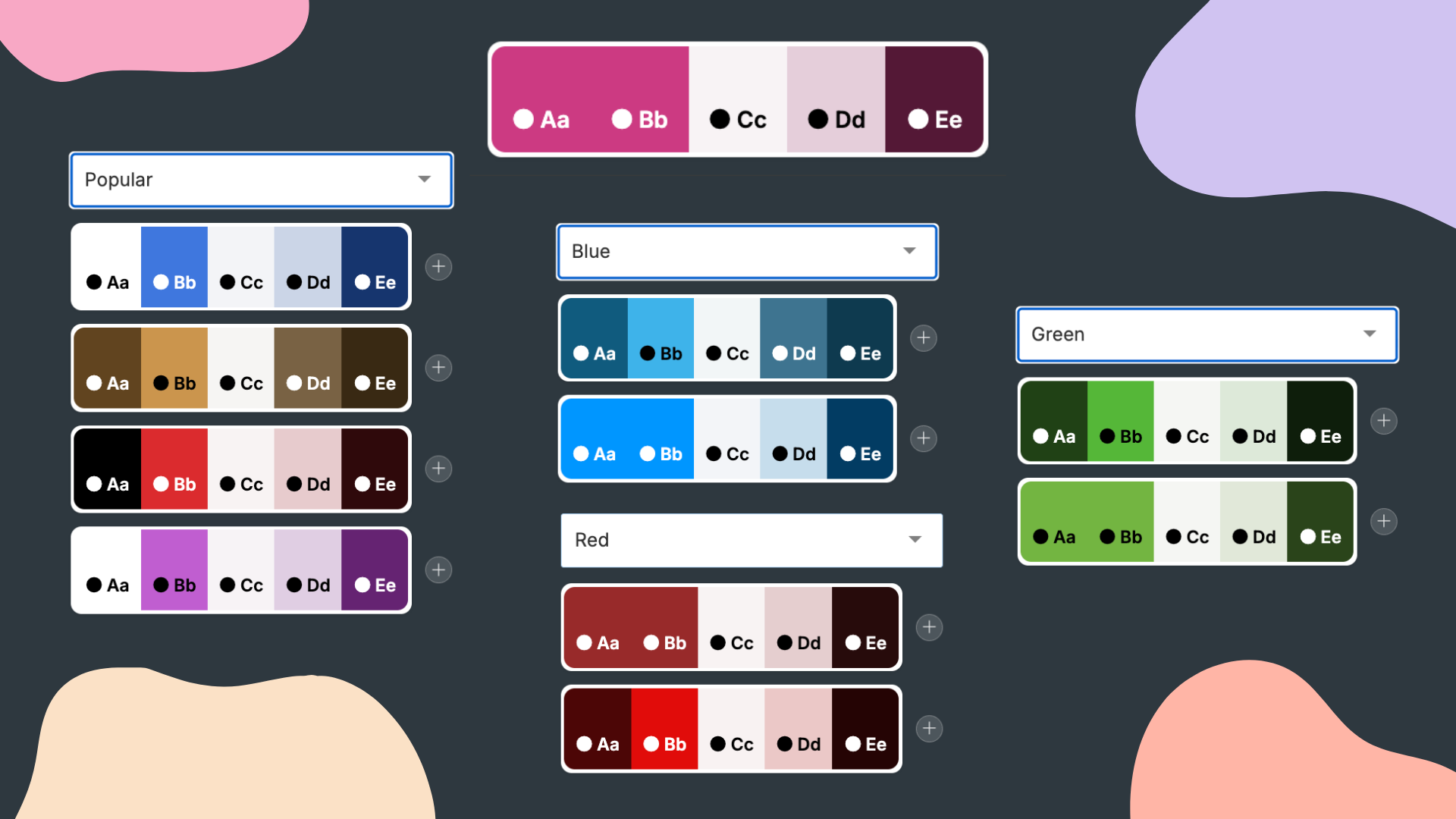
Picking the right colors shouldn’t feel like a design exam. We’ve redesigned the entire color experience with a new Color Palettes system that lets you choose from professionally curated combinations—so your site looks polished, consistent, and on-brand in just a click. Browse palettes by category, apply instantly, and switch easily between popular picks and your own custom colors.
🎨 120 curated palettes — ready-made color combinations that work beautifully together
🗂️ 10 palette categories — quickly find a look by mood, style, or vibe
⚡ One-click apply — update your site’s look instantly with a single selection
🔀 Improved navigation — a new Palettes tab replaces the old Colors tab for a cleaner workflow
⭐ Popular & Custom tabs — easier switching on Colors & Fonts pages (replaces the old custom buttons)
Your header titles are one of the first things visitors notice on every page—so having the right style makes a big difference. We’ve added a large set of new Header Title designs (including fresh SVG looks) plus new customization options, so you can match your headers to your brand, your layout, and the vibe of each page—whether you want bold and decorative or clean and minimal.
✨ Many new designs added — including new SVG-style header designs
📝 New “text-only” design — a clean option with just the title (no decoration)
📏 Header font size control — choose Extra Large / Large / Normal / Small
📍 Design position options — place the design under the header or under the header + slogan
🎨 More flexibility across pages — create consistent, professional headers site-wide
We’ve expanded the SEO tools inside Advisor to help users move from “checking SEO” to actually improving it. With the new Keywords Manager, users can organize target keywords, pull them from SEO audits, and run scans to see how well keywords are used across the site—so they can optimize content with confidence and track progress over time.
🔑 Keywords Manager — manage a keyword table in one place (manual keywords + keywords pulled from SEO Audit)
🔍 New Scan — scans the entire website content to find keyword occurrences across pages
📈 Track keyword usage — see where keywords appear and keep usage consistent throughout the site